Stay Updated

Get the Latest
In April of 2025, we debuted a new feature of our Patient Portal – self scheduling! We started on a trial basis with only the patients of Dr. Boe and have had a LOT of positive feedback. We are thrilled to share self scheduling is now open for ALL of our providers!
Please keep in mind, some of the limitations of self-scheduling are due to the available functionality of PCC (the EMR system we use). PCC is actively working on updates and new functionality, so we will be sure to let you know when those occur!
If you are not already using the Patient Portal, give us a call at 309-662-0504 and select option 3 - our schedulers are happy to set up this feature for you!
Key Things to Remember with Self Scheduling:
- If your child is ill, please call the office at 309-662-0504 and select option 1 for the nurse. If it is an emergency, please call 911.
- Please call to schedule medication follow-ups, pre-op appointments, consultations, etc. as we are currently offering only Well Visits for self-scheduling.
- If the patient account is flagged that we need to speak with a parent before scheduling, it will return a message stating “Please Call to Schedule.”
- Appointments cannot be cancelled within the Patient Portal – you will need to call the office if you need to cancel or change an appointment you self-scheduled.
- Multiple patient scheduling is available as of 10-13-2025!
- Note: We cannot accept an appointment under one patient with a note to include other patients at the same time.
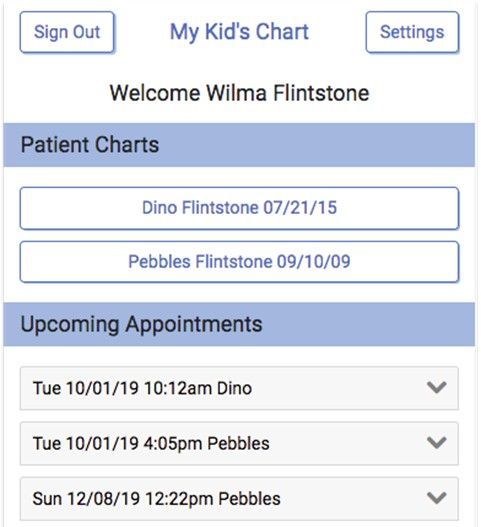
That all sounds great...How does it work?
After you log in to your Patient Portal, under the Upcoming Appointments tab, you will see an option to "Schedule Appointment".
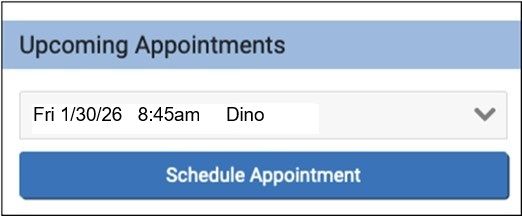
When you click that blue button, you will be prompted to select the category for the visit, as well as the patient who needs the appointment. Thanks to our recent update, you may now schedule multiple family members at the same time. *There is a limit of 4 well appointments at a time.
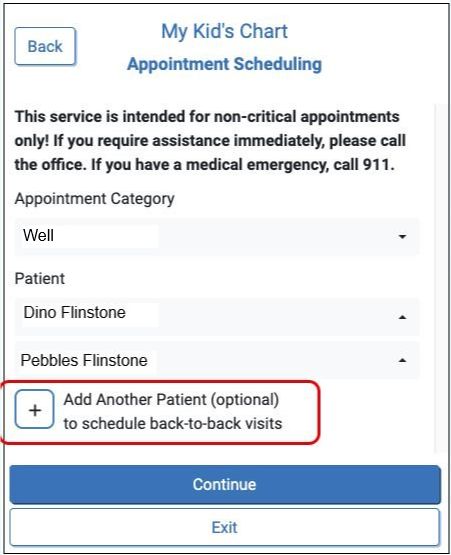
*If you are scheduling more than one patient and they have different providers, you will be prompted to schedule them individually.
Click "Continue" to select the appointment reason. Our system separates out Well Visits by age, so simply select the applicable age Well Visit for your child.
*We are currently offering self-scheduling for ages 2 months and older only.
- If your child is also due for a med check/mental health follow up, you may select the combination visit for the appropriate age.
Only the patient's Primary Care Provider will be available in the provider drop down selection. And since we only have one location, that will be the default in that section!
*If the provider shown in the dropdown is not your child's pediatrician, please do not use online scheduling to make a well visit. Appointments made with a physician who is not the child's PCP will be contacted to reschedule. If there is an error with the provider listed for your child, please call the office so we may correct it.

When you click "Find Appointments", it will return the next available appointment dates and times.
Many insurance companies require Well Visits to be at least one year apart. If the patient has a next physical due date in our system, the appointments offered will begin on that date.
*Please keep this in mind if you'd like to schedule multiple children - you may need to schedule each one separately if they do not have next physical due dates in the same timeframe.
If you are scheduling more than one patient, you will select a date and time and our system will return the closest open appointments for the additional children in the next screen.
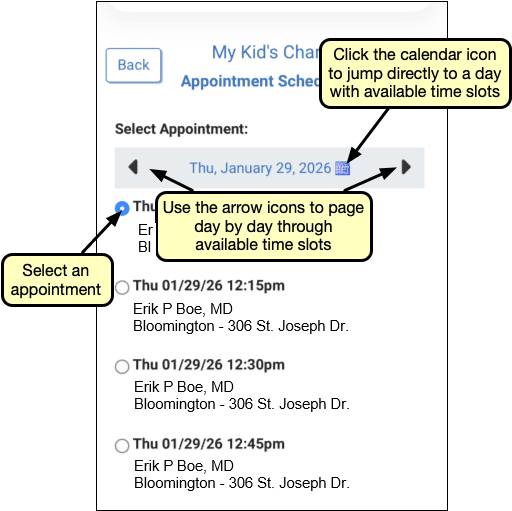
Once you have made your appointment selection, you will have an opportunity to review the details and add any notes, such as the patient will need a physical form for school or daycare.
At any time, prior to clicking “Schedule,” you may click “Back” to return and change selections in a previous step or click “Exit” to return to the patient portal home page without making an appointment.
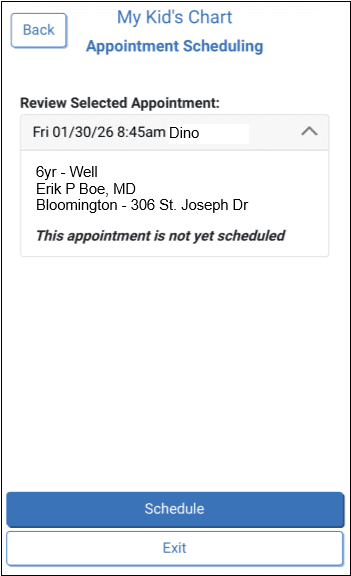
As noted above, appointments cannot be cancelled in the Patient Portal. If you find the appointment(s) made won’t work for you after all, just call the office and we’ll get it rescheduled for you!
We hope you are as excited as we are about this option for scheduling. We sincerely thank you for your patience as we worked to get everything just right before rolling it out!
Stay Well,
Bloomington Pediatrics